UAE corporate tax · VAT · books
Every client's deadline,
on one desk.
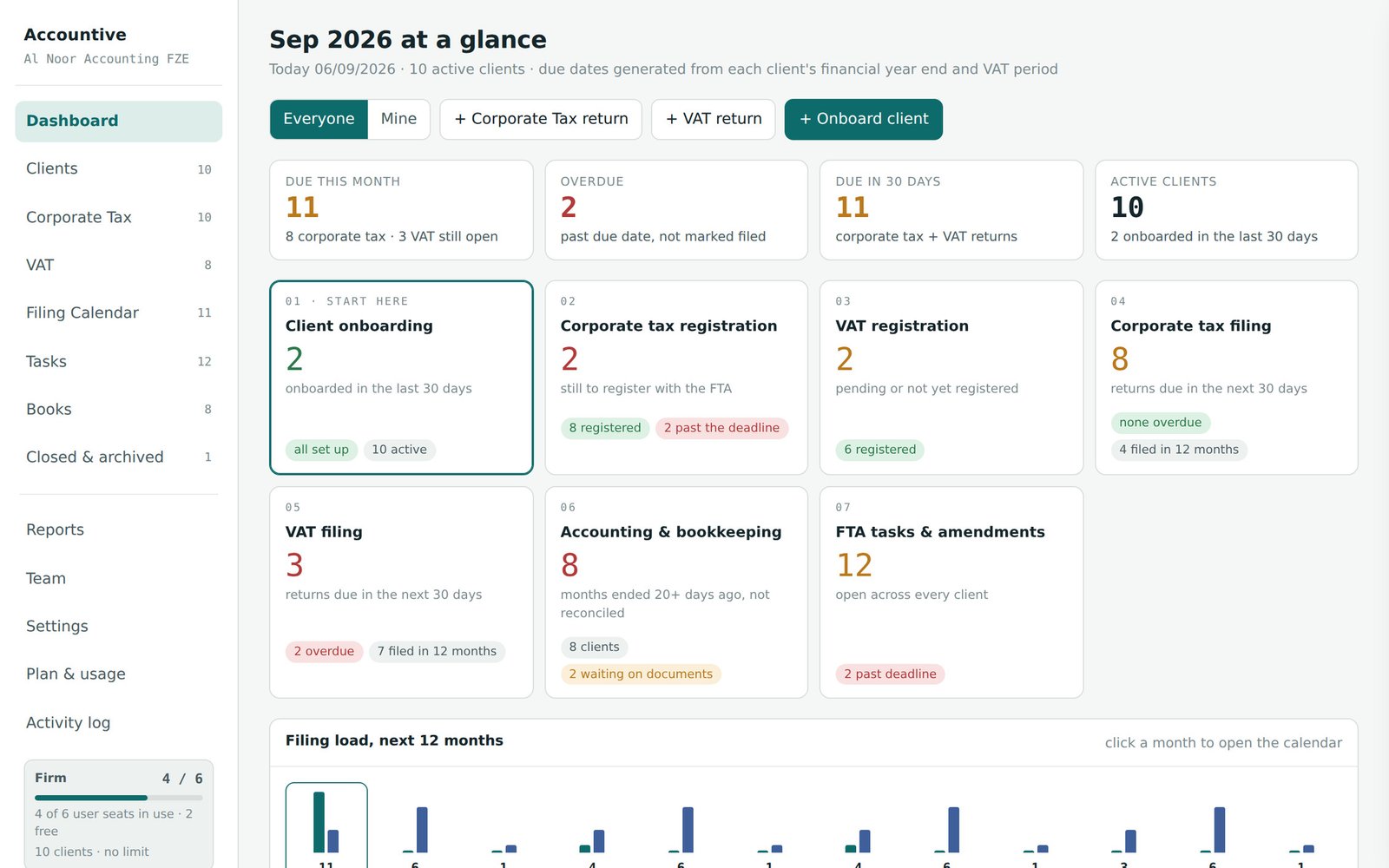
Practice management for UAE accounting firms, built inside a Dubai practice. Client onboarding, corporate tax registration, VAT registration, corporate tax filing, VAT filing, accounting and FTA tasks — every service line on one board, in the order the work actually happens.
No card. Unlimited clients on every plan. From AED 79 per user a month.
Why firms move
Seven things this desk does that a spreadsheet cannot.
Your list comes in as it is
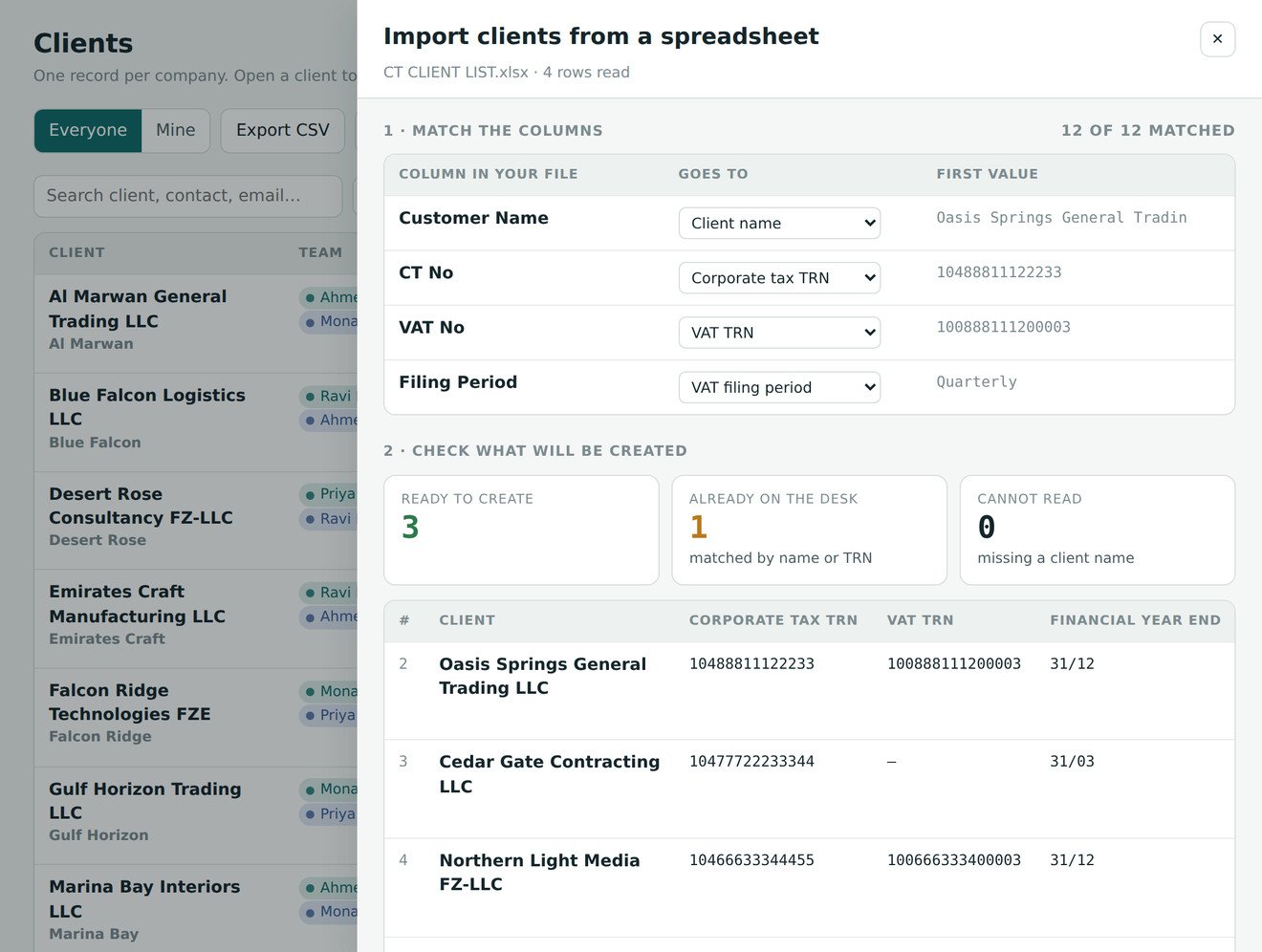
Upload the spreadsheet you already keep. Accountive reads your own headings — CT No, VAT No, Filing Period, Year End — shows you every row before it writes anything, and turns each one into a client with its registrations and deadlines already running.
You will not miss a filing
Every corporate tax and VAT date is generated from the client's own year end and cycle — never typed, never copied. Overdue sorts to the top of the day, a book month turns red on its own, and a licence cancellation raises its own de-registration clock.
Every service on one board
Client onboarding, corporate tax registration, VAT registration, corporate tax filing, VAT filing, accounting and bookkeeping, FTA tasks. Each with its own live count, each one click from the list behind it.
Onboarding starts the clock
Tick the services when the client is onboarded and the desk raises the registrations, the set-up tasks and every deadline that follows. Nothing is remembered by a person.
Customise it to your firm
Your own fields on the client record, your own steps inside every task, your own task types, your own saved reports. The desk bends to how your practice works rather than the other way round.
Sits beside your accounting software
Zoho Books, QuickBooks, Tally, Odoo or anything else — the ledger stays where it is. Bank statements come in, a corporate tax computation and a VAT working paper come out, reconciled to the closing balance.
Everyone knows who is doing what
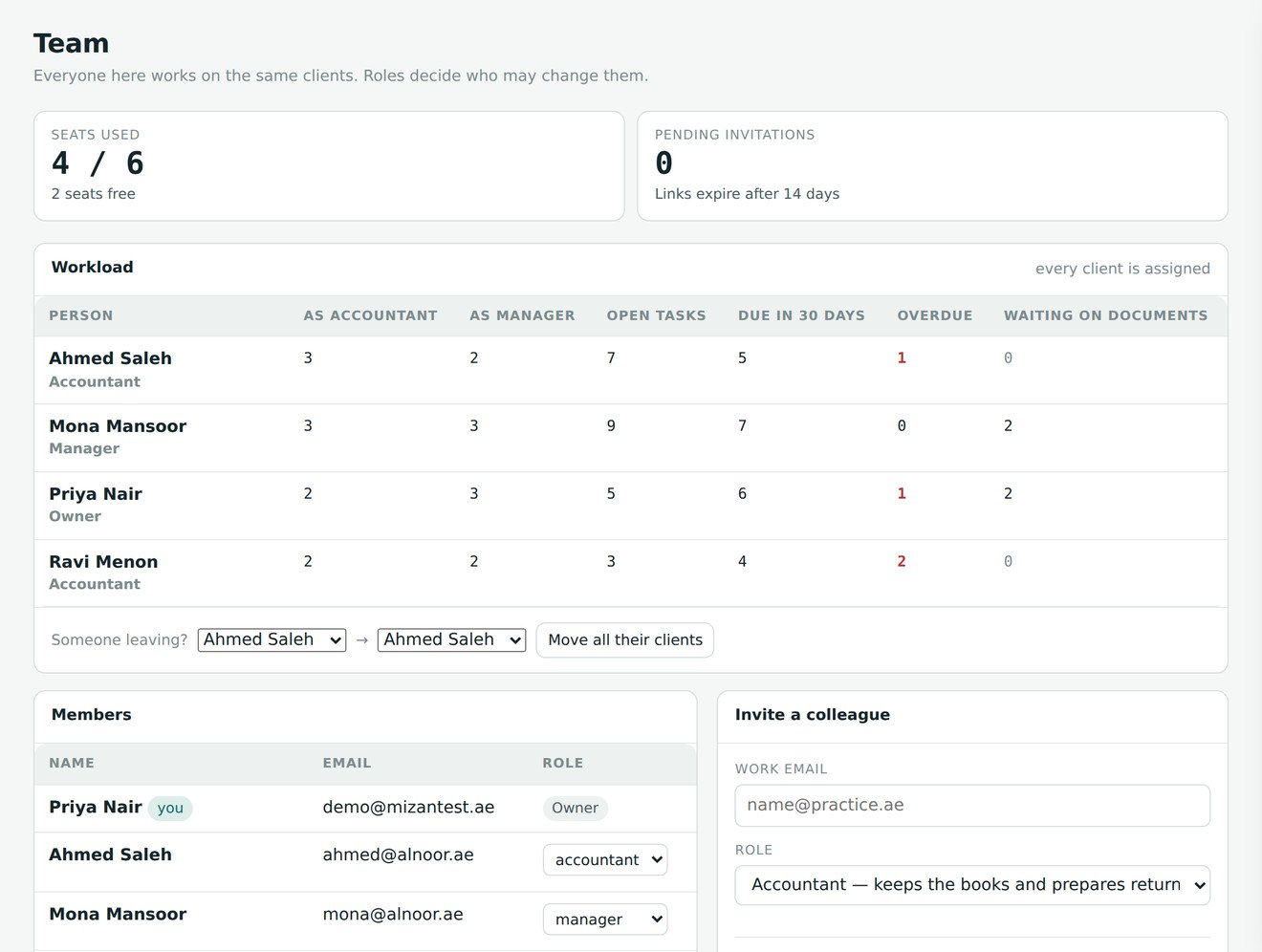
An accountant and a reviewing manager on every client, five access levels enforced by the database, workload per person, and one action to move a whole book when somebody leaves.
What a missed date costs
In the UAE, a forgotten deadline has a price list.
Cabinet Decisions 75 of 2023 and 49 of 2021 set the administrative penalties. They are per client, and they are not discretionary.
More than 640,000 companies are now registered for UAE corporate tax. Every one of them has a registration date, a first tax period, a return due nine months after year end and, for most, a VAT return on the 28th. Most firms hold that calendar in spreadsheets, WhatsApp threads and memory.
How it works
Onboard the client. Every date follows.
Onboarding is the only place anyone types a date. Enter the financial year end, the VAT cycle and the incorporation date, tick the services the firm is engaged for, and the rest generates itself — change a year end later and every future return moves with it.
A cancelled licence raises the de-registration and final-return tasks by itself, with the penalty clock written into the remarks. Registrations, de-registrations and the Zoho set-up are raised automatically the moment a service is ticked at onboarding.
What you get
The whole practice, not a to-do list with tax words on it.
Day one: your spreadsheet, read as it is
The list every firm already keeps — client name, CT number, VAT number, filing period, year end — goes in as it stands. Accountive matches your headings to its fields, normalises what it finds, and shows you the whole thing before a single record is written.
- Your headings, not ours: Customer Name, CT No, VAT No, Filing Period are recognised on sight, and anything unusual you map by hand
- Dates read the way UAE firms write them — 31/12/2025, 2025-12-31, 31 Dec 2025 or a real Excel date — and a year end of 31-12 becomes 31/12
- A client already on the desk is matched on name or TRN and left alone, or updated from the file — your choice, shown before you commit
- Each new client raises its own registration and set-up tasks, exactly as if you had typed it in — so the calendar is live the moment the import finishes
- A blank template with all twenty-six columns is one click away, and .xlsx, .xls and .csv all work
The monthly close, on one grid
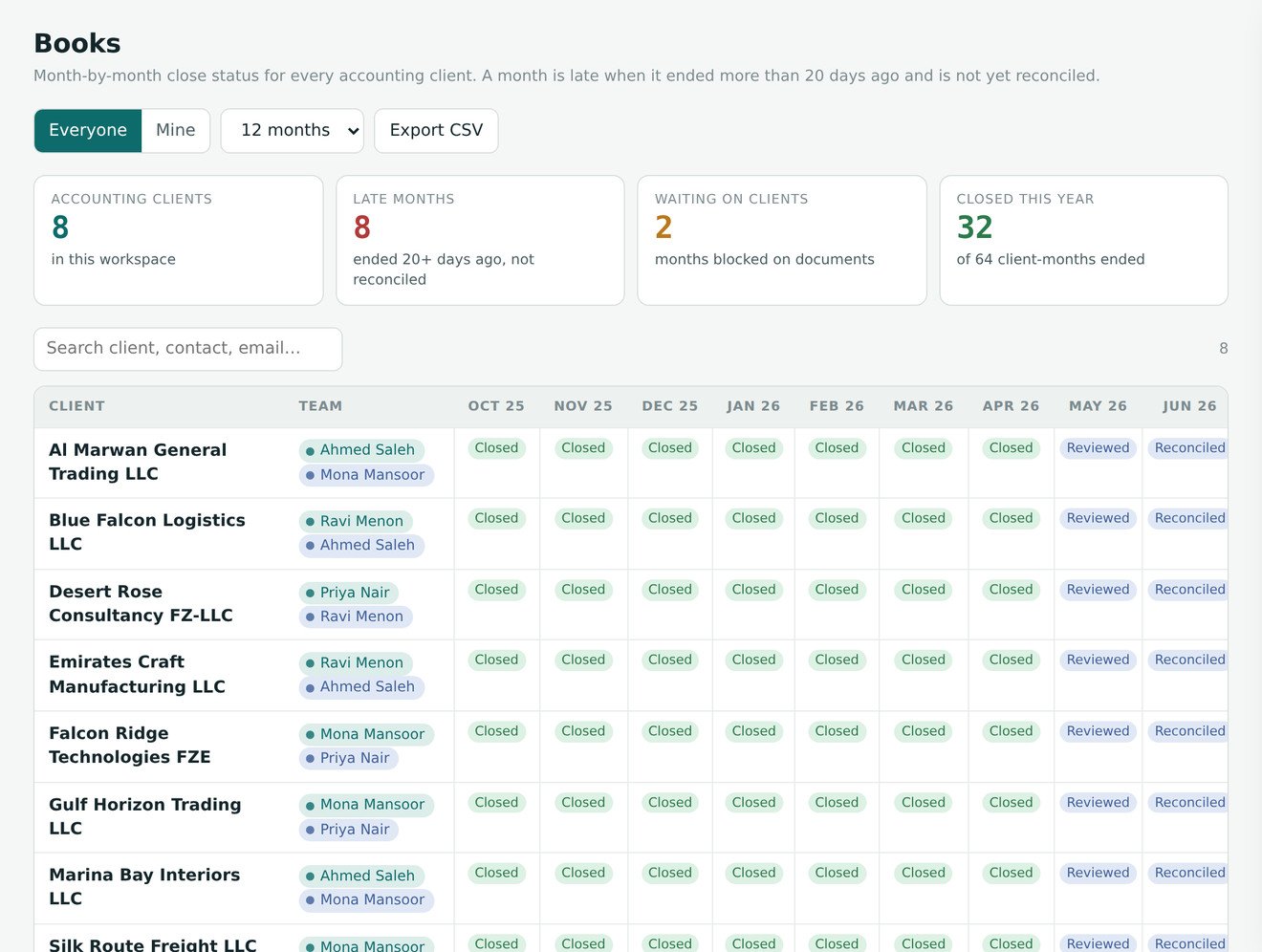
Every accounting client across the last twelve months, one cell per month. A month turns red when it ended more than twenty days ago and is still not reconciled — so the ones going quiet are the ones you can see.
- Waiting for documents → Documents received → Posted → Reconciled → Reviewed → Closed
- Click a cell to set the status and leave the note: “chased Faisal for the Mashreq statement”
- A books-start month per client, so a firm onboarded today is never late for last year
- One click raises that month's close task, owned by the client's accountant
A task is a checklist, not a note
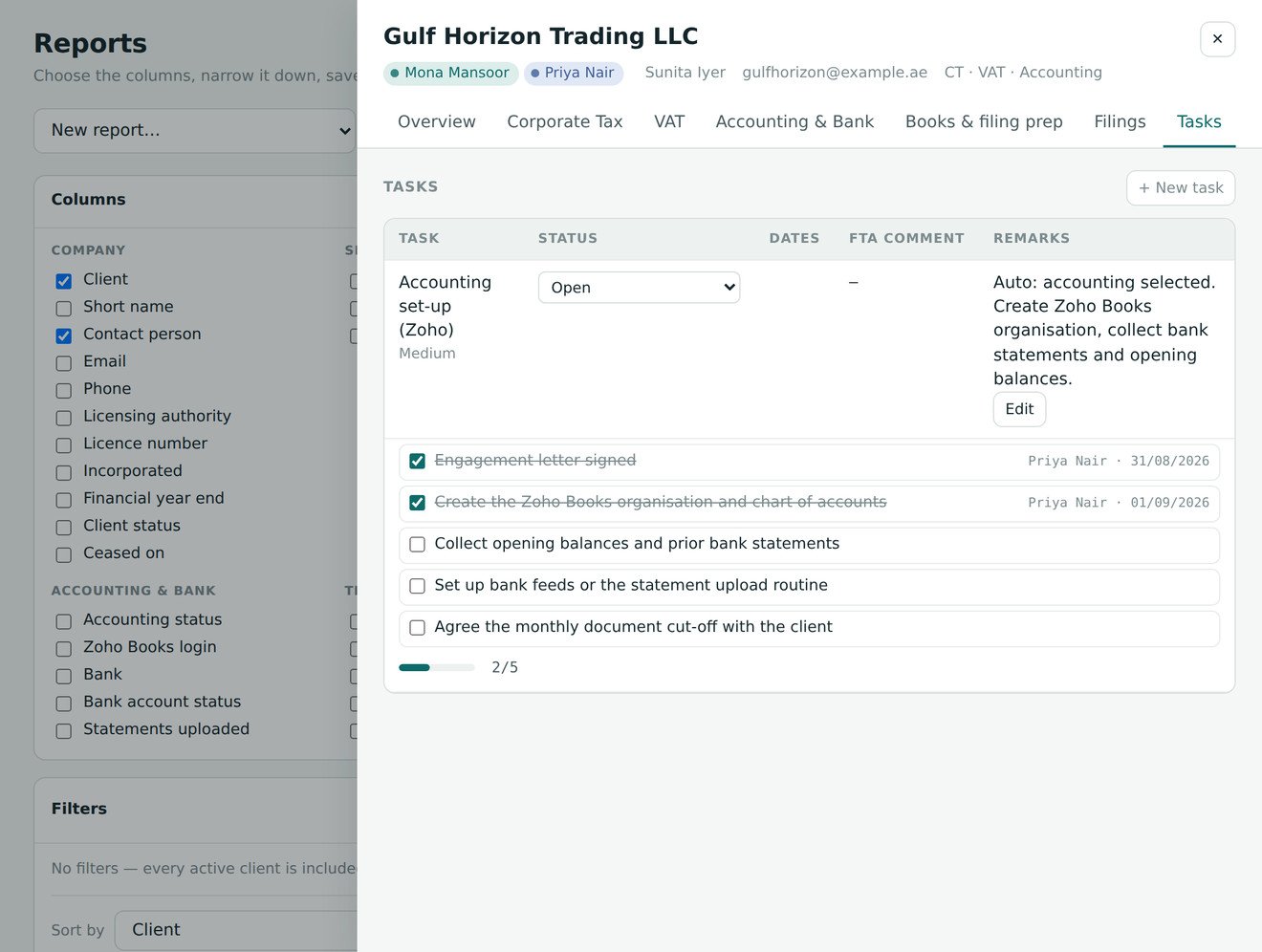
Pick Monthly accounting close and the steps appear: email the client, follow up after three working days, documents received, posted in Zoho, bank reconciled, sent for review, review points cleared, month closed. Every task type has its own sample, and your firm can rewrite all of them.
- Ticking a step records who and when, and writes a line to the activity log
- The task list shows progress and the next open step, so nothing needs opening to check
- CT and VAT returns carry their own checklists, from trial balance to payment reference
- Add task types nobody else has — an ESR notification, a Zakat computation — with their own steps
Who handles what, and what each person may do
Every client carries two names — the accountant who keeps the books and the manager who reviews before anything is filed. A junior opens the desk to their fifteen clients, not the firm's hundred and fifty.
- Five access levels: owner, admin, manager, accountant, advisor
- Workload per person: clients, open tasks, returns due in thirty days, months waiting on documents
- Someone leaving? Move their whole book to a colleague in one action, with an audit line on each
- Prepared-by and reviewed-by stamped on every return, which is what an auditor asks for
Your fields, your reports
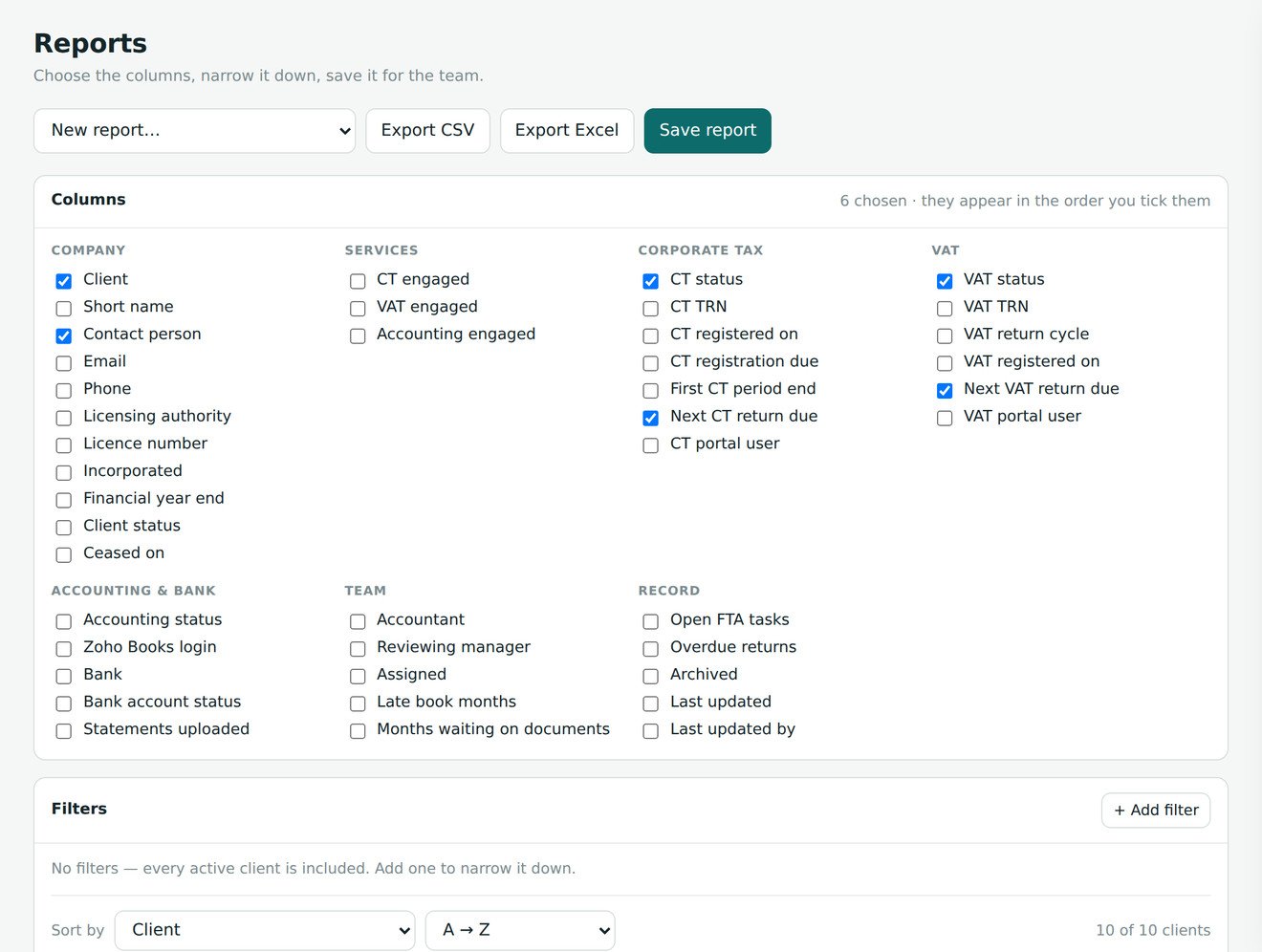
Every firm wants one field nobody else thought of — free zone, engagement fee, licence renewal date. Add it, place it on the tab where the right person is looking, filter on it, export it.
- Eleven field types, including AED amounts, dropdowns and dates
- Thirty-five built-in columns plus every custom field
- Filters that earn their keep: due in the next N days and is in the past
- Save a report for the team; export a real .xlsx where amounts stay numbers
Books module
From a bank statement to a filing position.
Upload the export from any UAE bank. The desk reads it, classifies it and drafts the working paper — a starting position for review, not a filed computation.
Any UAE bank
CSV or Excel straight from Emirates NBD, Mashreq, ADCB, RAK, WIO or Emirates Islamic. Day-first dates and newest-first exports are handled, including the opening balance that sits at the wrong end.
Rules tuned to UAE narrations
WPS salary, DEWA, Etisalat, POS settlement, inward remittance. Every correction you make becomes a rule, so the next statement arrives further along.
CT computation and VAT working paper
VAT extracted at 5/105, every line traceable back to the statement, reconciled to the closing balance. It removes the three hours before the review, not the review.
Security
A database rule, not a hidden button.
Each firm is its own workspace. Nobody sees another firm — including us, without being invited. Every permission below is enforced in the database, so editing the page, calling the API directly or replaying a request all get the same refusal.
Pricing
Per user, per month. Unlimited clients on every plan.
You pay for the people at the desk, not the companies you look after. Prices in AED, excluding 5% VAT. Fourteen days free before anything is charged.
Solo
One accountant looking after their own book of clients.
- Unlimited client companies
- CT and VAT registers, filing calendar
- Deadlines generated from each client's dates
- FTA tasks with step checklists
- Books close grid, twelve months
- Bank statement upload, CT and VAT working papers
- Portal and Zoho password vault
- CSV and Excel export
- Activity log
- Colleagues, roles and invitations
- Workload and bulk reassignment
- Custom fields
- Report builder
- Your own task step templates
Practice
Most firmsA team sharing the same client list, with review before filing.
- Everything in Solo
- Colleagues, invitations and five access levels
- An accountant and a reviewing manager on every client
- Mine / Everyone across every screen
- Workload per person and bulk reassignment
- Prepared-by and reviewed-by stamps on returns
- Approvals before anything is filed
- Shared password vault with role-based access
- Immutable audit log, readable by managers
- Custom fields
- Report builder
- Your own task step templates
Firm
A practice that wants the desk shaped around its own process.
- Everything in Practice
- Custom fields on clients, eleven types, placed per tab
- Report builder: 35 columns, filters, saved and shared
- Excel export with sized columns
- Your own task step templates, per task type
- New task types with their own checklists
- Custom fields as report columns and filters
- Priority support
| Feature | Solo | Practice | Firm |
|---|---|---|---|
| Capacity | |||
| Client companies | Unlimited | Unlimited | Unlimited |
| User seats | 1 | Any number | Any number |
| Archived clients (readable, free) | Unlimited | Unlimited | Unlimited |
| Corporate tax and VAT | |||
| CT and VAT registers with FTA statuses | ✓ | ✓ | ✓ |
| Deadlines generated from year end, cycle and incorporation date | ✓ | ✓ | ✓ |
| Filing calendar and 60-day return work queue | ✓ | ✓ | ✓ |
| De-registration and final-return clocks | ✓ | ✓ | ✓ |
| FTA tasks, raised automatically at onboarding | ✓ | ✓ | ✓ |
| Step checklists on tasks and returns | ✓ | ✓ | ✓ |
| Books | |||
| Monthly close grid, twelve months | ✓ | ✓ | ✓ |
| Bank statement upload and classification | ✓ | ✓ | ✓ |
| CT computation and VAT working paper | ✓ | ✓ | ✓ |
| Classification rules that learn from corrections | ✓ | ✓ | ✓ |
| Team | |||
| Colleagues and invitations | — | ✓ | ✓ |
| Five access levels, enforced in the database | — | ✓ | ✓ |
| Accountant and reviewing manager per client | — | ✓ | ✓ |
| Workload view and bulk reassignment | — | ✓ | ✓ |
| Approvals, prepared-by and reviewed-by stamps | — | ✓ | ✓ |
| Make it yours | |||
| Custom fields on clients | — | — | ✓ |
| Report builder, saved and shared | — | — | ✓ |
| Your own task step templates and task types | — | — | ✓ |
| Security and support | |||
| Portal and Zoho password vault | ✓ | ✓ | ✓ |
| Immutable activity log | ✓ | ✓ | ✓ |
| PIN re-lock for shared desks | ✓ | ✓ | ✓ |
| Light and dark, DD/MM/YYYY, Asia/Dubai | ✓ | ✓ | ✓ |
| Support | Priority | ||
Monthly billing is available on Practice and Firm with a three-seat minimum; Solo is annual only. Annual billing is about 23% below monthly. Prices exclude 5% VAT, which is added at checkout and shown on every invoice — give us your TRN there and it is recoverable input tax. Subscriptions renew automatically and you can cancel at any time; see the terms of service.
| Tool | Model | Per user / month | In AED | A team of 5, per year |
|---|---|---|---|---|
| Accountive · Practice | Per user, unlimited clients | — | AED 99 | AED 5,940 |
| Accountive · Firm | Per user, unlimited clients | — | AED 149 | AED 8,940 |
| Jetpack Workflow · Starter | Per user | USD 40 | AED 147 | AED 8,814 |
| Financial Cents · Team | Per user | USD 49 | AED 180 | AED 10,797 |
| Karbon · Team | Per user | USD 59 | AED 217 | AED 13,001 |
| Canopy · Standard | Per user | USD 74 | AED 272 | AED 16,306 |
| TaxDome · Pro | Per seat, per year | USD 83 | AED 306 | AED 18,363 |
Converted at the 3.6725 peg. None of them carries the FTA deadline engine, the EmaraTax password vault or UAE bank statement parsing — that work stays with you on every one of them.
Questions
The things firms ask first.
No. Every record carries its workspace, and the database refuses reads and writes across workspaces — it is a row-level policy, not a filter in the page. It was tested with two live accounts rather than reasoned about.
Nothing is deleted and nothing is charged. Every client you loaded stays fully readable, editable and filable. Only adding a new client stops until a subscription starts.
None on any paid plan. A three-person firm with two hundred clients pays for three seats. The trial is the only exception, and only because it is free.
Upload the spreadsheet you already keep. Accountive recognises the headings UAE firms actually type, reads day-first dates and Y/N columns, and shows you every row — new, already on the desk, or unreadable — before it writes anything. A hundred and fifty clients is one file and a few minutes, and each one arrives with its registrations and deadlines already running.
No. Accountive sits beside Zoho Books, QuickBooks or whatever you use. It carries the compliance calendar, the close status and the working papers; the ledger stays where it is.
EmaraTax and Zoho credentials live in a separate locked table, not in the client record. Advisors cannot read them at all, and the activity log records that a password changed — never the value.
Yes, at any time, and the change takes effect immediately. Ask from the Plan page inside the desk and we set it up — you are speaking to the people who built it, not a ticket queue.
SCORP, an accounting practice in Business Bay, Dubai. Accountive is the desk we built to run our own client book, opened up for other firms.
Load your client list. See every date you are carrying.
Fourteen days, every feature switched on, no card. Most firms have their whole list in within an afternoon.